> ## Documentation Index
> Fetch the complete documentation index at: https://docs.vidocsecurity.com/llms.txt
> Use this file to discover all available pages before exploring further.
# AI Chat
> Ask questions about the code and the findings of a scanned repository.
AI Chat needs the Enterprise plan on Vidoc Cloud. Included in self-hosted installations.
AI Chat answers questions about the code of a scanned repository and about its findings. You need the Developer role or higher. Users with the Read Only role cannot use AI Chat.
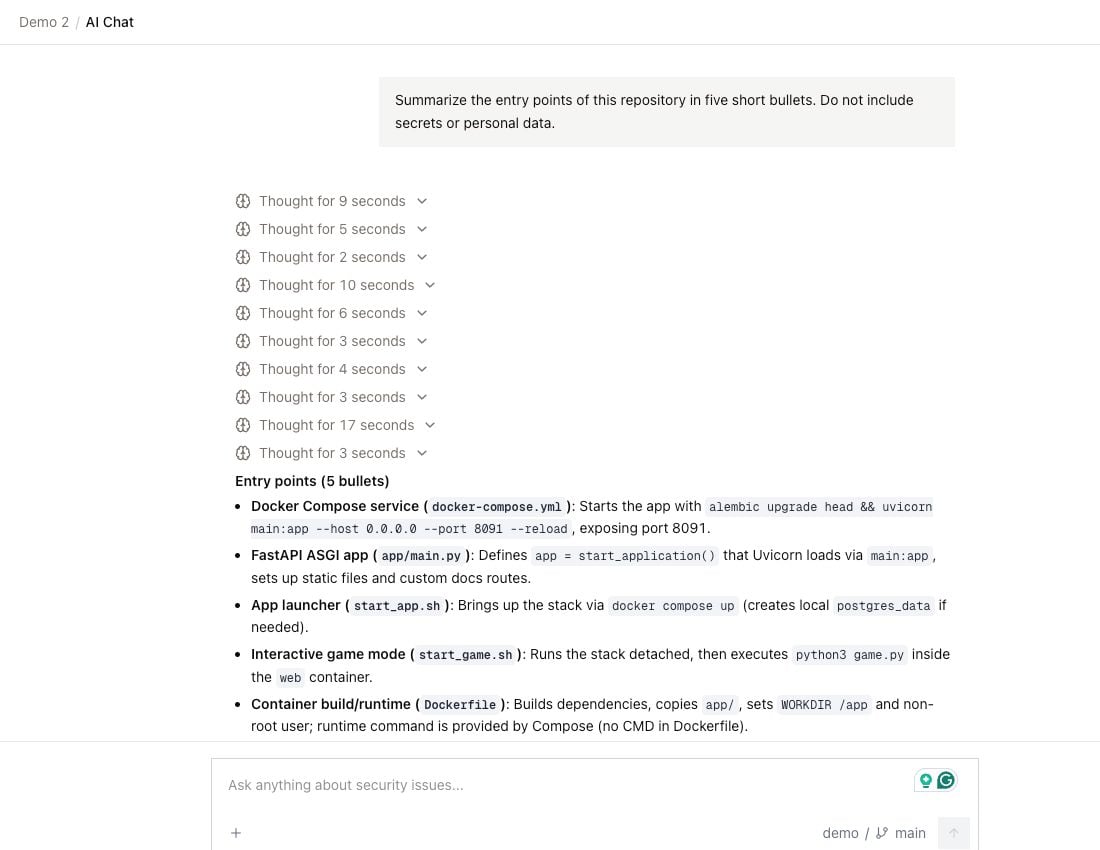 ## Start a chat
1. Click **AI Chat** in the sidebar.
2. Select a repository (**Select codebase**) and a branch (**Select branch**). The branch must be scanned.
3. Type your question, then send it.
To attach a finding, click **+**, then select **Attach issue**. Search by title, description, or CWE. You can also start a chat from the [issue panel](/web-app/findings#issue-panel) with **New chat**, or attach the issue to the open chat with **Add to chat**.
## What AI Chat can use
* It reads files only from the repository and the branch that you selected for the chat. It cannot read other repositories.
* It knows about a finding only when you attach the finding to the chat.
* It does not use [Memory](/web-app/memory).
* It cannot change code, findings, or Memory.
## Manage chats
Your chats are private. Other users cannot see them.
Your chats show under **Recent chats** in the sidebar. You can rename and delete a chat from its menu. To find a chat, click the search icon next to **Recent chats**.
## AI Chat and the Vidoc bot in pull requests
AI Chat and the Vidoc bot in a PR are different:
| | AI Chat | Vidoc bot in a PR |
| ------------------------------------------ | ---------------------------------- | ------------------------------- |
| Where | Vidoc web app | GitHub and GitLab PRs |
| Code it can read | The selected repository and branch | The repositories of the project |
| Uses Memory | No | Yes |
| Can change findings and add memory entries | No | Yes, on request |
For the bot, refer to [Commands and questions](/pull-requests/commands). On Vidoc Cloud, you can also ask Vidoc questions in [Slack](/web-app/slack).
## Start a chat
1. Click **AI Chat** in the sidebar.
2. Select a repository (**Select codebase**) and a branch (**Select branch**). The branch must be scanned.
3. Type your question, then send it.
To attach a finding, click **+**, then select **Attach issue**. Search by title, description, or CWE. You can also start a chat from the [issue panel](/web-app/findings#issue-panel) with **New chat**, or attach the issue to the open chat with **Add to chat**.
## What AI Chat can use
* It reads files only from the repository and the branch that you selected for the chat. It cannot read other repositories.
* It knows about a finding only when you attach the finding to the chat.
* It does not use [Memory](/web-app/memory).
* It cannot change code, findings, or Memory.
## Manage chats
Your chats are private. Other users cannot see them.
Your chats show under **Recent chats** in the sidebar. You can rename and delete a chat from its menu. To find a chat, click the search icon next to **Recent chats**.
## AI Chat and the Vidoc bot in pull requests
AI Chat and the Vidoc bot in a PR are different:
| | AI Chat | Vidoc bot in a PR |
| ------------------------------------------ | ---------------------------------- | ------------------------------- |
| Where | Vidoc web app | GitHub and GitLab PRs |
| Code it can read | The selected repository and branch | The repositories of the project |
| Uses Memory | No | Yes |
| Can change findings and add memory entries | No | Yes, on request |
For the bot, refer to [Commands and questions](/pull-requests/commands). On Vidoc Cloud, you can also ask Vidoc questions in [Slack](/web-app/slack).