> ## Documentation Index
> Fetch the complete documentation index at: https://docs.vidocsecurity.com/llms.txt
> Use this file to discover all available pages before exploring further.
# Insights
> See security metrics for one or more projects and export a CSV or PDF report of findings activity.
Insights needs the Enterprise plan on Vidoc Cloud. Included in self-hosted installations.
**Insights** shows security metrics for one or more projects. All roles can see Insights and export reports.
## Select projects
Use the project picker at the top of the page. Select one or more projects, or **All projects**. Insights shows only the projects that you have access to.
## Widgets
| Group | Widgets |
| ------------------ | -------------------------------------------------------------------------------------------------------------------------------------------------------- |
| Activity | **Issues solved**, **Scanned pull requests**, remediation time, **VIDOC-guided fixes** |
| Findings | **Issues by severity**, **Vulnerability noise** (detected, validated, patch generated), **Validated vulnerabilities** over time, **New critical issues** |
| Developer feedback | **Developer reactions** (thumbs up and thumbs down), **Addressed comments**, **Comments' score** |
| Trends | **Issues resolved**, **Memory growth**, **Open issues**, **Top Categories** |
## Export a report
1. Click **Export report**.
2. Set **Start date** and **End date**. The range can be 366 days or less. Dates are in UTC and include the first and the last day.
3. Select the **Severities**. Critical and high are selected by default.
4. Click **Download CSV** or **Download PDF**.
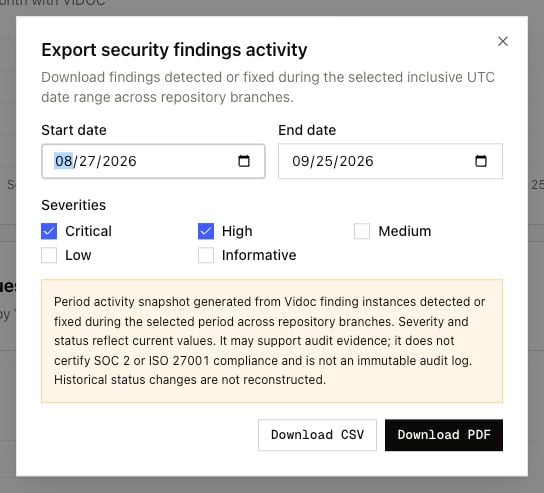 The report includes the findings that Vidoc detected or fixed in the period, on all repository branches of the selected projects.
The report is a snapshot. Severity and status show the current values, not the values on the dates of the period. Vidoc does not reconstruct the history of status changes. The report can support audit evidence, but it is not an immutable audit log and it does not certify compliance (for example SOC 2 or ISO 27001).
If the export fails:
* **Too many findings**: select a shorter date range or fewer severities.
* **No qualifying findings**: no findings match the date range and the severities.
* **The PDF is too large**: select fewer findings, or download the CSV.
The report includes the findings that Vidoc detected or fixed in the period, on all repository branches of the selected projects.
The report is a snapshot. Severity and status show the current values, not the values on the dates of the period. Vidoc does not reconstruct the history of status changes. The report can support audit evidence, but it is not an immutable audit log and it does not certify compliance (for example SOC 2 or ISO 27001).
If the export fails:
* **Too many findings**: select a shorter date range or fewer severities.
* **No qualifying findings**: no findings match the date range and the severities.
* **The PDF is too large**: select fewer findings, or download the CSV.