> ## Documentation Index
> Fetch the complete documentation index at: https://docs.vidocsecurity.com/llms.txt
> Use this file to discover all available pages before exploring further.
# Repositories
> Turn on PR reviews for a repository, control PR comments, set the source branch, and run full scans.
**Repositories** shows all repositories in the current project. Use it to turn Vidoc on or off for each repository.
To add repositories, an admin connects a source code platform and imports the repositories. Refer to [GitHub](/integrations/github), [GitLab](/integrations/gitlab), or [Bitbucket](/integrations/bitbucket).
 ## Repository list
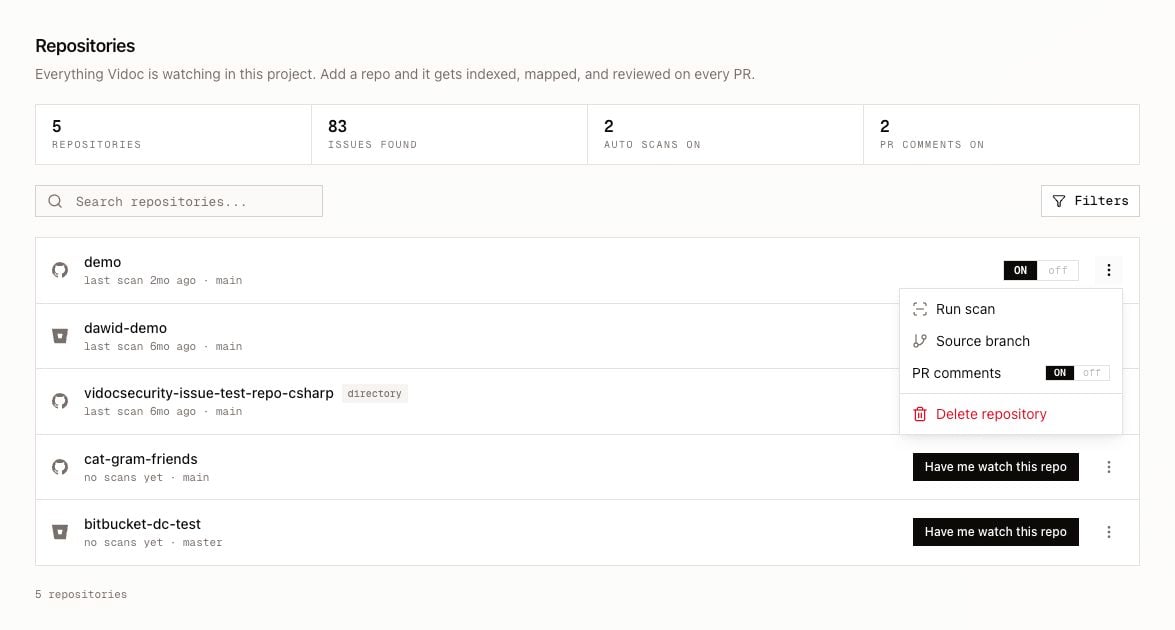
The top of the page shows the number of repositories, the issues found, the repositories with automatic scans on, and the repositories with PR comments on.
* Use **Search repositories...** to find a repository by name.
* Click **Filters** to show only some providers, or only repositories with scanning on (**Scanned only**).
Each row shows the repository name, the provider, the status, and the source branch. The status can be:
| Status | Meaning |
| ------------------------------------ | ------------------------------------------------------------------------------------------------------------------------ |
| `indexing…` | Vidoc reads the repository to prepare scans. |
| `queued for indexing` | Indexing starts soon. |
| `waiting for plan activation` | Vidoc Cloud only. The organization has no active plan. Indexing and PR reviews start when an admin activates a plan. |
| `indexing failed` | Vidoc could not index the repository. Turn PR reviews off and on again. If the problem continues, contact Vidoc support. |
| `reviewing now…` | A scan of the repository runs now. |
| `last scan ` or `no scans yet` | The date of the last scan. |
## Turn on PR reviews
When PR reviews are off, the row shows **Have me watch this repo**. Click it to turn on PR reviews. When PR reviews are on, the row shows an **ON** / **off** toggle.
When you turn on PR reviews:
1. Vidoc indexes the repository.
2. On the Enterprise plan and on self-hosted installations, Vidoc then runs a first full scan of the default branch (the **Source branch** setting).
3. Vidoc scans each new PR and each new commit in a PR. For all the events that start a scan, refer to [Pull request reviews](/pull-requests/overview).
Platform differences:
* **GitLab:** Vidoc creates the project webhook.
* **Bitbucket:** you create the webhook in each repository by hand. Refer to [Bitbucket](/integrations/bitbucket).
You need the Developer role or higher.
**Vidoc Cloud:** if the organization has no active plan, Vidoc does not index the repository and does not scan PRs. The page shows a banner. An admin clicks **Activate plan** to open [Billing](/web-app/settings#billing).
## Repository options
Open the options menu (**⋮**) of a repository.
| Option | What it does |
| --------------------- | ------------------------------------------------------------------------------------------------------------------------------------------------------------------------------------------------------------ |
| **Run scan** | Starts a full scan of the source branch. If a scan of the repository runs already, Vidoc does not start a new scan. |
| **Source branch** | Sets the branch that Vidoc uses for full scans and for the issue counts of the repository. This is usually the default branch, for example `main`. Type the branch name exactly, then click **Save branch**. |
| **PR comments** | When off, Vidoc still scans PRs and shows the results in the web app, but it does not post anything to the source code platform. |
| **Delete repository** | Removes the repository from Vidoc and cancels its running scans. You need the Admin or Security Engineer role. |
**Run scan** needs the Enterprise plan on Vidoc Cloud. Included in self-hosted installations. On other plans, the menu does not show **Run scan**.
You can also scan a local copy of a repository with the CLI. Refer to [Scanning with the CLI](/cli/scanning).
## Repository page
The repository page needs the Enterprise plan on Vidoc Cloud. Included in self-hosted installations. On other plans, a click on a repository opens [Pull requests](/web-app/pull-requests).
Click a repository to open its findings. The page is the same as [Findings](/web-app/findings), with these differences:
* The page shows only the findings of this repository.
* Use **Branch** to show the findings of one scanned branch. By default, the page shows the source branch.
* If the source branch was never scanned, the page tells you.
* **Scan Repository** shows the commands to scan the repository with the CLI or with GitHub Actions. Refer to [CI/CD](/cli/ci-cd).
## Repository list
The top of the page shows the number of repositories, the issues found, the repositories with automatic scans on, and the repositories with PR comments on.
* Use **Search repositories...** to find a repository by name.
* Click **Filters** to show only some providers, or only repositories with scanning on (**Scanned only**).
Each row shows the repository name, the provider, the status, and the source branch. The status can be:
| Status | Meaning |
| ------------------------------------ | ------------------------------------------------------------------------------------------------------------------------ |
| `indexing…` | Vidoc reads the repository to prepare scans. |
| `queued for indexing` | Indexing starts soon. |
| `waiting for plan activation` | Vidoc Cloud only. The organization has no active plan. Indexing and PR reviews start when an admin activates a plan. |
| `indexing failed` | Vidoc could not index the repository. Turn PR reviews off and on again. If the problem continues, contact Vidoc support. |
| `reviewing now…` | A scan of the repository runs now. |
| `last scan ` or `no scans yet` | The date of the last scan. |
## Turn on PR reviews
When PR reviews are off, the row shows **Have me watch this repo**. Click it to turn on PR reviews. When PR reviews are on, the row shows an **ON** / **off** toggle.
When you turn on PR reviews:
1. Vidoc indexes the repository.
2. On the Enterprise plan and on self-hosted installations, Vidoc then runs a first full scan of the default branch (the **Source branch** setting).
3. Vidoc scans each new PR and each new commit in a PR. For all the events that start a scan, refer to [Pull request reviews](/pull-requests/overview).
Platform differences:
* **GitLab:** Vidoc creates the project webhook.
* **Bitbucket:** you create the webhook in each repository by hand. Refer to [Bitbucket](/integrations/bitbucket).
You need the Developer role or higher.
**Vidoc Cloud:** if the organization has no active plan, Vidoc does not index the repository and does not scan PRs. The page shows a banner. An admin clicks **Activate plan** to open [Billing](/web-app/settings#billing).
## Repository options
Open the options menu (**⋮**) of a repository.
| Option | What it does |
| --------------------- | ------------------------------------------------------------------------------------------------------------------------------------------------------------------------------------------------------------ |
| **Run scan** | Starts a full scan of the source branch. If a scan of the repository runs already, Vidoc does not start a new scan. |
| **Source branch** | Sets the branch that Vidoc uses for full scans and for the issue counts of the repository. This is usually the default branch, for example `main`. Type the branch name exactly, then click **Save branch**. |
| **PR comments** | When off, Vidoc still scans PRs and shows the results in the web app, but it does not post anything to the source code platform. |
| **Delete repository** | Removes the repository from Vidoc and cancels its running scans. You need the Admin or Security Engineer role. |
**Run scan** needs the Enterprise plan on Vidoc Cloud. Included in self-hosted installations. On other plans, the menu does not show **Run scan**.
You can also scan a local copy of a repository with the CLI. Refer to [Scanning with the CLI](/cli/scanning).
## Repository page
The repository page needs the Enterprise plan on Vidoc Cloud. Included in self-hosted installations. On other plans, a click on a repository opens [Pull requests](/web-app/pull-requests).
Click a repository to open its findings. The page is the same as [Findings](/web-app/findings), with these differences:
* The page shows only the findings of this repository.
* Use **Branch** to show the findings of one scanned branch. By default, the page shows the source branch.
* If the source branch was never scanned, the page tells you.
* **Scan Repository** shows the commands to scan the repository with the CLI or with GitHub Actions. Refer to [CI/CD](/cli/ci-cd).