

- Review each pull request (PR) and write a summary comment and inline comments.
- Resolve its own comment threads when a later scan shows that the issue is fixed.
- Read commands and questions that mention
@vidocin PR comments. - Record feedback from replies and 👍/👎 reactions on its comments.
- Show a check run with a Run Vidoc button, when status reporting is on.
Requirements
- Vidoc Cloud
- Self-hosted
- Your repositories are on github.com. Vidoc does not support GitHub Enterprise Server.
- You install the Vidoc GitHub App, vidoc-agent, on your GitHub account or organization. If you are not an owner of the GitHub organization, an owner must approve the installation.
- You have the Admin role in Vidoc.
Connect GitHub
You must have the Admin role in Vidoc.1
Open the Integrations page
In the web app, open the account menu and select Integrations. On the GitHub card, click Connect. If GitHub is already connected, click the card, then click Add connection.
On Vidoc Cloud, the onboarding flow shows the same steps when you create your organization.
2
Sign in with GitHub
In Connect to GitHub (step 1 of 3), click Continue with GitHub. Sign in to GitHub in the window that opens and authorize Vidoc. If you signed in to GitHub before, Vidoc skips this step.
3
Install the Vidoc GitHub App
In Install Vidoc App (step 2 of 3), click Install GitHub App. On GitHub, select the account or organization. Select the repositories that the app can access, then complete the installation.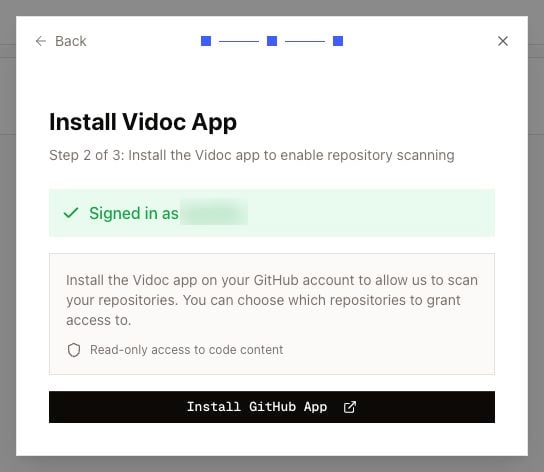
4
Import repositories
In Import GitHub repositories, select the repositories to add to the current project. Click Import selected repositories.
Import more repositories later
- Open Integrations > GitHub.
- Open the actions menu of the GitHub account and select Import repositories.
Turn on PR reviews for repositories
Open Repositories in the web app. Each repository has a PR reviews toggle. You must have the Developer role or higher to change it.- On Vidoc Cloud, Vidoc turns on PR reviews automatically for the repositories that you import. On self-hosted installations, turn on the toggle for each repository.
- When PR reviews turn on, Vidoc indexes the default branch of the repository. On the Enterprise plan and on self-hosted installations, Vidoc then runs a first full scan of the default branch. Refer to Scan types.
- You do not create a webhook. The GitHub App sends the PR events to Vidoc.
- Vidoc then reviews each new PR and each new commit on a PR.
On Vidoc Cloud, indexing and PR reviews start only when your organization has an active plan. The Repositories page shows a message when repositories wait for plan activation.